I run most of my sites, including this blog, off a mini PC in my basement.1 I have a gigabit fiber internet and host mostly simple, non-media intensive applications, so bandwidth isn't really an issue, but I don't have a static IP address, so I tunnel all my traffic through a Digital Ocean VM. It looks something like this:
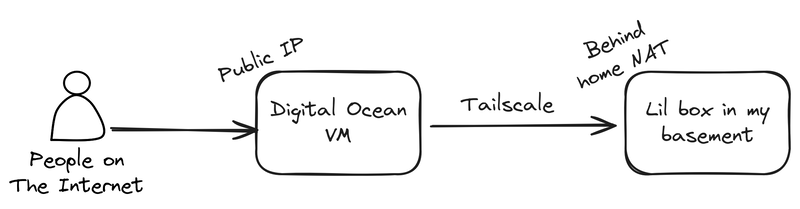
There's a little Caddy server running on the VM, which basically just acts as a domain name allowlist for deciding what traffic is worthy of forwarding to my home network.
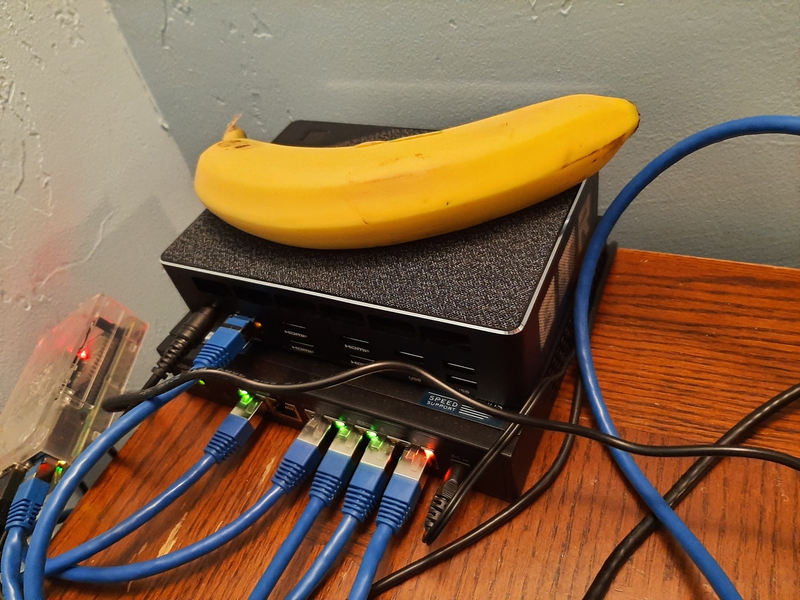
My homelab, in all its glory overwhelming underwhelmingness. Banana for scale.
I've used this setup for years2 and it's worked more or less flawlessly the entire time. But recently, like within the past month or two, things have taken a turn for the glacial. All my public sites were suddenly noticeably slow, to the point where images (even highly optimized WebP images) were loading row by painstaking row. And the latency from "entering the URL" to "having a loaded page" was several seconds, even on very simple pages.
It's also hard to overstate how little traffic I get. Running iftop on my VM, and bmon on my home router,3 I could see that I was getting a few kilobytes per second of traffic. You could probably serve that over a dial-up modem. So the bottleneck likely wasn't my ISP, or Digital Ocean, or anything like that.
As for the true culprit, my first guess was DERP, which is basically just a relay server for cases where networks are too weird, locked down, or broken to get a peer-to-peer setup working. And interestingly, this was around the time when Tailscale announced their Peer Relays, so I wonder if something4 was causing their globally distributed DERP server fleet to get overloaded, degrading my services in the process.
But wait, why are we DERPing in the first place?
This begs the question: if our VM has a public IP, it kinda seems like we shouldn't need a DERP server at all. But I definitely know DERP was in use. Running tailscale status from my laptop yielded:
$ tailscale status
[ ... other devices ...]
100.64.0.x   tunnel   linux   active; relay "sfo"; ...
My laptop is on the same home network as my mini PC server and they're both on the same Tailnet,5 so it's pretty likely they'll connect to the tunnel VM in the same way. That relay "sfo" bit in the output is saying that we're using Tailscale's sfo DERP relay to connect. So the actual flow of traffic is more like:
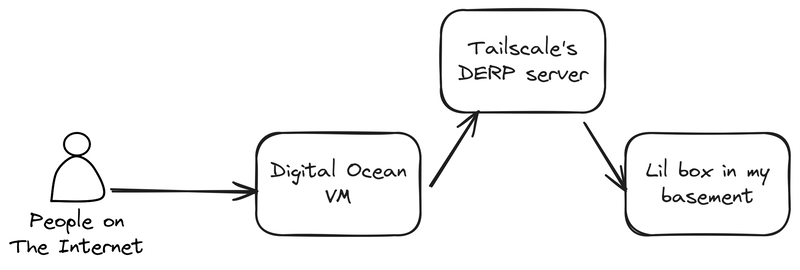
And for years, this wasn't an issue. Mostly because the VM is also in the San Francisco area, so it's not like traffic was bouncing around the globe on its way to me. But still, we really shouldn't need DERP, so what gives?
Initially, I tried a few different things that didn't work:
- Opening port 41641 to UDP traffic on the VM's firewall - According to Tailscale's documentation, this can be useful for getting a direct connection. I'm fairly confident this shouldn't have been required, but it was worth a try!
- Enabling the embedded DERP server in Headscale - I've failed to mention that I'm running Headscale, a self-hostable implementation of the Tailscale control server. It's running on that same VM. This was kind of a hail mary, and as you might expect, the VM can't use itself as a DERP server, because that doesn't really make any sense. This is still useful if I have two other devices that need DERP, as they can now use my (non-overloaded) VM instead of Tailscale's DERP servers.
- Futzing around with Digital Ocean IP addresses - I have a Reserved IP for the VM, which ensures the IP doesn't change across reboots. This is important because a changing IP address means all your DNS records are now pointing to some other random machine and all your websites would go dark6 until you fixed it. When SSH'd into the VM, I noticed that the main network interface was using the ephemeral IP instead, so I tweaked some network settings7 and set the Anchor IP as the gateway.
Alas, none of these things actually fixed the issue, we were still DERPing all our traffic. My next line of investigation was to make sure UDP traffic on port 41641 could actually reach the VM. Just because I configured the firewall for the VM at the Digital Ocean-layer doesn't mean that I didn't have something on the VM blocking it, or even my home network.
A simple way to test that is with netcat. Basically, have the server listen for UDP traffic on port 41641 and see if we can communicate with it from our laptop:
# Start listening on the server
sudo nc -u -l 41641

# From my laptop, send something to that server
echo "Is 41641/udp working as expected?" | nc -u $VM_PUBLIC_IP 41641
But to do this, we need to stop tailscaled first, because it's already listening on port 41641. That's the whole reason we're doing this experiment!
So I ran sudo systemctl stop tailscaled, did the experiment, and everything worked as expected, meaning Is 41641/udp working as expected? showed up on the server.
But I got my first real clue when tailscaled failed to start up again, and the logs were full of stuff like:
tunnel tailscaled[2989]: Received error: PollNetMap: Post "https://$MY_HEADSCALE_URL/machine/map": all connection attempts failed (HTTP: unexpected HTTP response: 308 Permanent Redirect, HTTPS: reading response header: EOF)Huh, that seems odd, let's look at the Headscale server logs:
ERR http internal server error error="noise upgrade failed: unsupported client version: v1.36 (56)" code=500Oh no. I see. Well, this is embarrassing. Turns out my server was running a THREE YEAR OLD version of Tailscale. So while I had Headscale on the latest version, and all my other clients on the latest version,8 I'd completely neglected the VM's Tailscale client. This is, unsurprisingly, bound to cause some problems. After a sudo apt {update,upgrade} and sudo systemctl restart tailscaled, we were back in business. And this also resolved the DERP issue! tailscale status now shows a direct connection:
100.64.0.x gtr6-caddy linux active; direct $HOME_IP, ...Looking back, this also explains a bunch of strange behavior I couldn't explain in the past, like why ping $SERVER_TAILSCALE_IP and SSHing worked just fine, but tailscale ping $SERVER would time out. Running an extremely outdated piece of software is going to cause all sorts of weird protocol failures, I'm honestly shocked it worked for so long. Falling back to DERP is a strange failure mode, but I'm trying not to think too hard about it.
But did that fix the problem?
Okay, so we've got DERP out of the picture, are our sites fast again? The answer, mercifully, is an unambiguous yes. I never bothered profiling any of this because it was such a night and day difference, but my sites are now loading in under half a second, and they subjectively feel as fast (if not faster!) than they were before Tailscale's DERP servers started struggling.
-
It's a Beelink GTR6 that I got used on eBay for $400. It was mislabeled as a different, less powerful model, so I think I got an extra good deal on it. ↩
-
I've swapped out tunnel VMs + the hardware I run at home, but the general shape of the setup (public VM, tunnel over Tailscale), has been mostly unchanged. ↩
-
Which is running OpenWRT ↩
-
Like, for example, scrapers that are bottom trawling the internet for every last token, with the express purpose of feeding them into the great maw of LLM training. Some examples here. ↩
-
"Tailnet" is what you call your Tailscale network, e.g. all of your devices that can communicate with each other over some
100.64.x.xIPs or some magic DNS names ↩ -
Or worse, point to some totally other random thing for some different Digital Ocean customer. ↩
-
Mostly just
sudo ip addr add $RESERVED_IP/32 dev eth0andsudo ip route replace default via $ANCHOR_GW dev eth0 onlink, then editing/etc/network/interfacesto make those changes persist past the next reboot. ↩ -
Roughly
1.94at the time of writing ↩